Technology News etiketine sahip kayıtlar gösteriliyor. Tüm kayıtları göster

29 Temmuz 2015 Çarşamba

Direct Download MICROSOFT WINDOWS 10 RTM 2015 MSDN x86 x64 Original ISO'S


Download information of Windows 10 MSDN Original Multiple Home/Pro ISO'S

To activate Windows 10 all versions:

When you install the Windows 10, it will ask you for  key, and ;
THERE IS A SKIP BUTTON ON THE BOOT SETUP FOR KEY ENTRY. DO
NOT COMPLAIN ABOUT ENTERING A KEY. PRESS SKIP EVERYTIME II ASKS YOU FOR A KEY !

You can use Microsoft Toolkit 2.5.3 (torrent link from MDL forums) to activate your Windows 10 and use all features of it. While KMS activators (like Microsoft Toolkit) do work, but we don't recommend them as they 
set your Activation channel to a default MAK (Multiple activation keys) and MS (Microsoft) likely knows the difference. They could kill that activation later with a WAT update. 

For permanent activation I recommend you to upgrade from 7 or 8, but the system has to be activated and not the Enterprise version of Windows 7 or 8. I recommend Windows 7 Pro/Ult activated with WinLoader (Daz Loader) to upgrade to 10 Pro though Windows Insider Program. Make sure your network connection is online during upgrade or the activation will not happen. After successful upgrade and system showing activated, then you can re-install from boot (a clean install) by downloading Windows 10 of your choice from below links and it should (automatically) re-activate from MS servers. It reads your hardware info, not key. Key will be generic for this upgrade offer of Windows 10. Do not try to enter one during boot setup unless you bought Win10.

All the activation Information source: Murphy78 from MDL forum !


DIRECT LINKS FROM MICROSOFT
This is the same build that was sent to OEMs. It is RTM.
It is also the same build that is on MSDN. The only differences are the version and ISO structure/compression.

en-GB (English-International):

Home x64: http://fg.ds.b1.download.windowsupdate.com/d/updt/2015/07/10240.16384.150709-1700.th1_clientcore_ret_x64fre_en-gb_3c38de69920aa4e4aea18912de6222777ef11885.esd

Home x86: http://fg.ds.b1.download.windowsupdate.com/d/updt/2015/07/10240.16384.150709-1700.th1_clientcore_ret_x86fre_en-gb_ef4b4cfd1f12bf4cbb089a306e5a496cdc3cfd89.esd

Pro x64: http://fg.ds.b1.download.windowsupdate.com/c/updt/2015/07/10240.16384.150709-1700.th1_clientpro_ret_x64fre_en-gb_a626d24601cb35f513c09cc43131d41b865c3109.esd

Pro x86: http://fg.ds.b1.download.windowsupdate.com/c/updt/2015/07/10240.16384.150709-1700.th1_clientpro_ret_x86fre_en-gb_138d74496ff2262811b4584824d4ae4573941e3a.esd

Home n x64: http://fg.ds.b1.download.windowsupdate.com/d/updt/2015/07/10240.16384.150709-1700.th1_clientcoren_ret_x64fre_en-gb_ff5f0c8fcaa5ace6c933bc377d2f44e744ec00a6.esd

Home n x86: http://fg.ds.b1.download.windowsupdate.com/d/updt/2015/07/10240.16384.150709-1700.th1_clientcoren_ret_x86fre_en-gb_d357ce6b0eb2cb95c139cc95fb590e1ddb82b576.esd

Pro n x64: http://fg.ds.b1.download.windowsupdate.com/c/updt/2015/07/10240.16384.150709-1700.th1_clientpron_ret_x64fre_en-gb_01699998b27387a9b2dbe2361723654676ce1300.esd

Pro n x86: http://fg.ds.b1.download.windowsupdate.com/c/updt/2015/07/10240.16384.150709-1700.th1_clientpron_ret_x86fre_en-gb_e6af19b547c0465892070f13240792539936978c.esd

Home single lang x64: http://fg.ds.b1.download.windowsupdate.com/d/updt/2015/07/10240.16384.150709-1700.th1_clientsinglelanguage_ret_x64fre_en-gb_0c56a45c303b3f8853d2fd8378863f9fbaf6871e.esd

Home single lang x86: http://fg.ds.b1.download.windowsupdate.com/d/updt/2015/07/10240.16384.150709-1700.th1_clientsinglelanguage_ret_x64fre_en-gb_0c56a45c303b3f8853d2fd8378863f9fbaf6871e.esd

Education x64: http://fg.ds.b1.download.windowsupdate.com/d/updt/2015/07/10240.16384.150709-1700.th1_clienteducation_ret_x64fre_en-gb_5569766ff6d47f3eaf2bbf9a827cf56355c14bf2.esd

Education x86: http://fg.ds.b1.download.windowsupdate.com/d/updt/2015/07/10240.16384.150709-1700.th1_clienteducation_ret_x86fre_en-gb_0103d0e6e743863d2cffeb89ac2df7daa88a0bff.esd

Education n x64: http://fg.ds.b1.download.windowsupdate.com/d/updt/2015/07/10240.16384.150709-1700.th1_clienteducationn_ret_x64fre_en-gb_3c344dc9102766eed4e49ef4aedff679fde57a83.esd

Education n x86: http://fg.ds.b1.download.windowsupdate.com/d/updt/2015/07/10240.16384.150709-1700.th1_clienteducationn_ret_x86fre_en-gb_422cd618b146705f7e2354dfd52eff4601c4fd03.esdSource

Convert ESD to ISO 
Download the ESD dycrypter here
Extract to a directory and place esd in same folder. Then drag esd file onto decrypt.cmd and follow instructions I highly recommend closing all programs when decrypting an esd file. It is highly CPU intensive and can cause errors if you have programs interfering with the use.

Understanding Windows 10 versions

Windows 10 is whole new concept from MS, there is now two branches in MS one is Long Term Servicing Branch (LTSB) and Current Branch (CB) in Windows 10, Understand more here: Windows It Pro's Article

And so major as here too: Zdnet Article


Installing Windows 10? Fix 35+ Privacy Issues With Just One Click ! (
via: The Hacker News)


So you finally upgraded your system to Windows 10 and became one those 70 Million users.
No doubt, Windows 10 is the Windows best version released by Microsoft, but you need to know that it does not offer much privacy by default.
Windows 10 is making many headlines these days, even it made me to write two detailed articles about Windows 10’s most controversial options, i.e. Windows Wi-Fi sense and Windows 10 stealing users' Bandwidth to deliver updates.
I noticed over 35 more privacy issues that come enabled by default in Windows 10, which has permission to send your vast amount of data back to Microsoft.
While Installation, a click through "Express Settings" allows Windows 10 operating system to gather up your contacts, text and touch input, calendar details, and a lot more, including:
Location Data
Biometrics and Handwriting data
Advertisement and its Tracking Code
Apps access to your personal information
Windows Defender and Sample submissions
Microsoft OneDrive
Cortana & Web search
Telemetry services
Webcam and Microphone Access
Sync Data with other Devices
Using Microsoft account, Instead of local account
Sending Feedback & diagnostics reports to Microsoft
and many more...

Download: DonotSpy10

'APPLY' and 'RESTART' to Save Changes
The app makes changes in the Registry in the background, so you need to reboot the system once for changes to take effect.

UPDATE: False-Positive Antivirus Alerts
Note: Your Antivirus product may detect this tool malicious in nature because it can modify Windows settings.
However, developer of the tool is also using an advertisement campaign within the software (mentioned in its End-User License Agreement), so it could also be detected as an Adware, or Pup (potentially unwanted program).
Technically, the program is not a malware and you can uninstall it after using once to fix Windows 10 privacy issues.

Thank me If I saved you a beer ! :)

20 Ekim 2014 Pazartesi

Control your PC with your phone, turn your Android phone in to to complete remote control by using same WiFi

You can turn your Android phone in to to complete remote control by using same WiFi with an application called WiFi Mouse Pro


Description
Transform your phone into a wireless mouse, keyboard and trackpad using WiFi Mouse. WiFi Mouse supports speech-to-text as well as multi-finger trackpad gestures. It also support media controller, explorer controller and ppt presentation controller features. WiFi Mouse enables you to control your PC, MAC or HTPC effortlessly through a local network connection.
Features:
* Mouse cursor movement:
Slide on phone's screen to make the PC/Mac mouse cursor make movement.
* left and right click support
Tap the phone's screen to make PC/Mac mouse left button click.
Double fingers tap the phone's screen to make PC/Mac mouse right button click.
* Middle mouse button scroll
Up/down slide the phone's middle button picture to make PC/Mac middle mouse button scroll.
Two fingers slide up/down to make PC/Mac middle mouse button scroll.
* Remote keyboard input:
Press any mobile phone's key picture, PC/Mac will do the same thing.
* PC/Mac hot keys and combination key:
You can press two keys at the same time, such as ALT+F4,Ctrl+C,Ctrl+P and so on.
* Speech-to-text input for all languages:
If you input method support voice input, PC/Mac will show the same text as the phone get.
* Close to proximity sensor to show desktop:
When your hands close to the phone's proximity sensor to make PC/Mac show desktop.
* Mouse & keyboard full screen:
Very big Mouse buttons and key button.
* Remote media player controller:
You can play/pause/next/previous media players, such as Windows media players, VLC,
Winamp and so on.
* Remote explorer controller:
Unified remote control IE/Chrome and other internet explorer, you can close the tab,
go to home page,create new tab, go to favorite list, refresh the current page and so on.
* PPT Presentation controller:
You can start/stop Power Point /Keynote, and turn the next/previous page for presentation.
* Auto-connect on application startup
* PC/Mac window controller:
Maximize/Minimize/close the current window.
* Compatible with XP/Windows Vista/Windows 7/Windows 8/Mac OSX/Linux (Ubuntu).

Gestures:
* Tap-to-click
* Tap and move for drag
* Two finger tap for right click
* Two finger scroll
* Pinch to zoom
* Three finger drag or highlight
* Four finger swipe down to show desktop
* Four finger swipe up to maximise current window
* Four finger swipe sideways to change current window focus
* Left handed mouse support (swap left and right mouse click)
* Show desktop when hands over proximity sensor

How to get it worked

You can download the WiFi Mouse Pro application from here
After downloading , you can transfer and install/sideload the application in to your phone.

::::::Make Sure you Enable This::::::


Now download and install (very small size, less than 1 MB) the respective  mouse server  for the OS you're using from below:

Windows

Mac

Linux 32 bit  Linux 64 bit


After downloading the WiFi Mouse Server run it on your computer, open the WiFi Mouse app (make sure you're connected to the same WiFi network on your PC/MAC and your phone too)  and click on "Auto Connect" now you are able to control PC/MAC with your Android phone !


If you Like my post, Please share it with others !

6 Ekim 2013 Pazar

Directly download Android Apps, Apk (Android application package) files from Playstore to your computer


However, there are a few apps which are extremely useful but not available in all countries. Or maybe you’re in an area for a longer period of time where your device itself doesn't have internet.


The app you’d like might not even be found in the Google Play Store — although this is a rare occurrence. No matter what the issue at hand is, it’d be great if you can manually install, or “side load”, apps onto your Android device. But how do you do this?

Downloading Apk file: Officially, you cannot get the APK files of any app directly from the Google Play Store. However, there is an Google chrome extension  which can download them — albeit breaking the Play Store’s Terms of Service.

Download here

Instructions:
Step 1: Install Google Chrome if you don't already have it.

Step 2: Type "chrome://extensions" in the address bar without the quotes and press enter.

Step 3: Drag and drop the '2.0.0.crx' file that you downloaded into the Extensions page that's opened up in Chrome. Press 'Add' in the popup box that comes up.

Step 4: Click the Options link beneath the APK Downloader entry on the Extensions page and you will be asked to provide your email, password and device ID. Enter the email address and password associated with your Google Play account. Keep this page open.

 
Step 5: Download and install the Android Device ID from the play store. Once installed, open the DeviceID app and note the GSF ID KEY (Google Service Framework). Type these into the APK Downloader Settings page that you kept open in Chrome in Step 4.

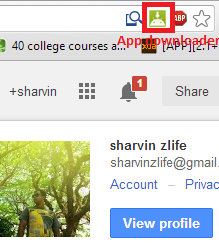
Step 6: Click on sign in  and you will see are signed in something like in the image below.


Smile,you are done. Now whenever you browse the Play Store from Chrome, you can click on the APK Downloader icon that comes up in the address bar to download the APK file. See Screenshot below.


Just navigate to playstore and download the applications you ever want by clicking on the app downloaded icon that appears on the address bar. (You need the purchase paid apps or it can't be download)

Another way around
If you don't have chrome browser or if you want to manually download APK files, you can try another method.
1. Got to this website: APK Downloader

2. Just enter Package name (device Id), you can find the Package name at the end of the URL in Google Play Store, see the image below. Just copy and paste the package name in the above website.


3. Click on generate download link, then it will show the option to download like 'Click here to download..' Download and enjoy !


Hope you all liked my article, if you have any doubts or queries, please feel free to comment. I'm ready to help you out.


3 Ağustos 2013 Cumartesi

The bendable notebooks

The Real Notebook is a laptop concept that delves into the advantages of bendable AMOLED screens. It gives the notebook design a push in the direction of actually flipping through a book. This notebook is perfect synergy towards to make technology devices more realistic and natural.


1 Haziran 2013 Cumartesi

Virtual Digital Video Glasses For iDevices

Anxious to get your hands on a pair of Google Glasses? Well the Virtual Digital Video Glasses might help hold you over until you get that chance.


Compatible with Apple’s iPhone, iPad and iPod these video glasses boast a 72″ virtual screen and built-in ear buds, providing a nice alternative to the big screen for watching movies and playing video games. You can purchase a pair here.


19 Şubat 2013 Salı

Panasonic Dorutsu EW-DL32 electric toothbrush with ultrasonic vibrations!


Panasonic will release its all new Dorutsu EW-DL32 toothbrush with sonic vibrations in the month of May. With three different attachments and teeth stain remover the battery operated electric toothbrush cleans you teeth like never before with 31,000 linear ultrasonic vibrations per minute. To remove stains from your teeth you can use the diamond tip attachment which allows much denser cleansing routine impossible to achieve with normal brush bristles. To clean you tongue there is the tongue cleaner attachment and to keep the gums free from any germs there is the oval brush attachment.

The electric toothbrush can be operated in three different rhythm modes depending on your brushing habits. The charging is done by a non-contact method as you have to simply place the toothbrush on the charger. Measuring 25 x 30 x 210 mm and having total body weight of 90 grams the Dorutsu EW-DL32 toothbrush lasts for 90 minutes on one charge of 17 hours. The battery operated toothbrush comes in three colors; silver, grey and pink at the price of US$194 (18,000 Yen).
Via: Panasonic.Jp

15 Şubat 2013 Cuma

Rrobot restaurant in Harbin, Heilongjiang Province, China!!

  • Twenty robots work at the Robot Restaurant in Harbin
  • They can deliver food, cook, usher and entertain diners
  • The popular restaurant opened in June last year
  • Each robot costs between £20,000-£30,000 each

Service with a smile has turned sci-fi at this restaurant as diners are waited on and cooked for by robots.
At Robot Restaurant 20 robots deliver food to the table, cook dumplings and noodles, usher diners and entertain them in Harbin, Heilongjiang province in China.
When a diner walks in, an usher robot extends their mechanic arm to the side and says 'Earth person hello. Welcome to the Robot Restaurant.'
Scroll down for video
A robot delivers a dish to hungry diners at Robot Restaurant where 20 robots are used to deliver and cook food as well as usher customers and entertain them
Droid delicacies: A robot delivers a dish to hungry diners at Robot Restaurant where 20 robots are used to deliver and cook food as well as usher customers and entertain them
After diners have ordered, robots in the kitchen set to work cooking their meals.
Once the dish is prepared, a robot waiter, which runs along tracks on the floor, carries it from kitchen to table.

Prepared dishes are placed on a suspended conveyor belt and when the plate reaches the right table the mechanical arms lift it off and set it down.
As they eat, a singing robot entertains diners.
A robot prepares dumplings at the restaurant
Robot ready: A robot prepares dumplings in the restaurant kitchen before the meal is delivered to diners by waiter robots

Robot waiters run along tracks on the floor to carry meals from the kitchen to diners
Serve and deliver: Robot waiters run along tracks on the floor to carry meals from the kitchen to diners
The restaurant has gained international fame and continues to grow in popularity since it opened in June last year.
Chief Engineer Liu Hasheng, said they invested 5 million Yuan (about £500,000) in creating the restaurant, with each robot costing 200,000 to 300,000 Yuan (around £20,000 to £30,000).
The robots can work continuously for five hours after a two-hour charge.
Mr Hasheng said: 'Staff in the computer room can manage the whole robot team.
'After the busy times during the day, the robot will go for a "meal", which is electricity.'
Human staff manage the robots which cost up to £30,000 each
Human hand: Human staff manage the robots from the kitchen, which cost up to £30,000 each
Customers look on as a robot prepares food at the restaurant which has made international headlines since it opened in June last year
Mechanic masterchef: Customers look on as a robot prepares food at the restaurant which has made international headlines since it opened in June last year
The robots range in height from 4.3 to 5.25ft and can display more than 10 facial expressions and say basic welcoming lines to diners, local media reported.
The restaurant offers a menu with more than 30 dishes and for the average cost for a diner is £4 to £5.
In 2010, another robot restaurant opened in Jinan in northern Shandong province, where robots resembling Star Wars droids circle the room carrying trays of food in a conveyor belt-like system.
More than a dozen robots operate in the restaurant as entertainers, servers, greeters and receptionists.
San Franciso-based company Momentum Machines announced plans for a new fast food restaurant chain where all the cooking is done entirely by robots last year.
Their burger-making machine is capable of making 350 hamburgers per hour.
Meet and greet: A robot that specialises in greeting people tries to entice customers off the street in Harbin

A boy reaches for his food order delivered to him by a waiter robot which can work for five hours continuously after a two hour electric charge
Droid destination: A boy reaches for his food order delivered to him by a waiter robot which can work for five hours continuously after a two hour electric charge

Video: Robots serve food and drinks at restaurant in Harbin China


24 Kasım 2012 Cumartesi

Bonsai from solar panels will charge mobile phones and tablets!


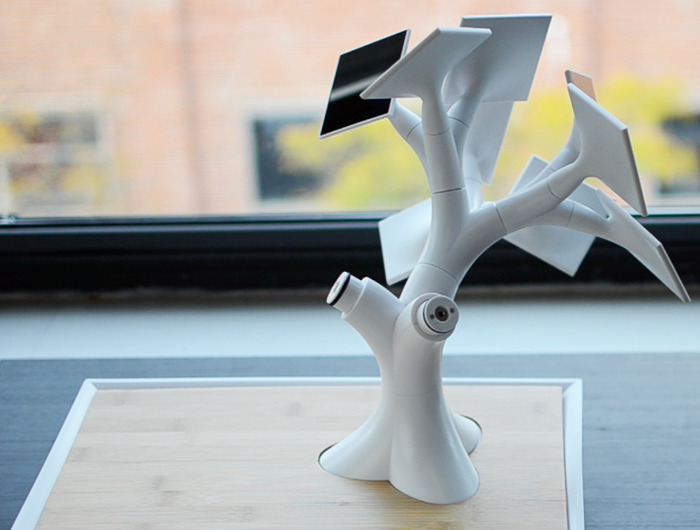
Powered by Social Investment Kick starter is seeking funds to start an unusual project Electree + +. He is a small artificial tree in the Japanese style bonsai, instead of leaves which are solar panels. The device is able to easily charge any portable gadgets.

 
Electrer + started life in 2008 as a concept French designer Vivien Muller. He tried to put his idea into practice and started collecting pre-orders for the device pr price $ 370. To get enough funds to start production, he was hoping for four per-orders, but he managed to get only two hundred, so the project had to be postponed indefinitely.

But Mueller did not despair and continued to work on his invention. He improved the design of the device and has increased its energy efficiency. Adding the name of an artificial tree is one more sign "+", he again tries to bring his idea to market. Updated Electree + + has a built-in battery to 14,000 mAh (this is enough to charge the nine iPhone 5) and 27 solar panels on the tips of the branches. To fully charge, unusual bonsai should be exposed to light for 36 hours


Electree + + has two USB-ports - one for charging smartphones and one for tablets. The device supports wireless charging technology, so that smartphones equipped with this feature (for example, Nokia Lumia 920) for bonsai will not even have to connect, just put on a wooden base plate.

Contents can be pre-ordered on Kickstarter in just $ 199. The creators hope the device is at least 1,000 pre-orders, which should bring $ 200 000. So far their pre-orders made ​​just 38 people, but on the Kickstarter campaign will last 38 days, so that the project has a good chance to implement.

Watch the Video here, Its amazing!


22 Kasım 2012 Perşembe

AMAZING FLYING CAR BY TERRAFUGIA


Given the fact that roads are getting more and more crowded, car manufacturers thought that it would be nice if they could also conquer the sky. That is exactly what Terrafugia Inc. thought in 2010 when they started working on an innovative project, a vehicle that could be driven on the road and also fly if the driver considers he needs to get faster to his destination. That’s what the name of the company symbolizes, Terrafugia’s name being Lation for “escape the Earth”.

The project name is Terrafugia - Transition the Roadable Light Sport Aircraft, and its success depends only on the public’s reaction. We say that because the corporation already has already received the flight authorization for the vehicle. It also complies with the Federal Motor Vehicle Safety Standards (FMVSS), so if you want it all you have to do is place a deposit and you’ll get your own flying car by the end of the year.

Terrafugia announced that the anticipated base price is $279,000 and you can place a refundable deposit of $10,000 or a non-refundable deposit of $2,500.

The official specifications reveal that the vehicle can cruise in the air at 105 mph (172 km/h) and it’s top speed is at 115 mph (185 km/h). On the road it’s much slower, topping at 65 mph (105 km/h). It can cover a distance up to 490 miles in air (787 kilometers) and in case of unexpected problems it’s equipped with a full vehicle parachute, capable of landing the entire aircraft.

If you’re thinking of buying Terrafugia’s “hybrid”, you need the money and a pilot license you can get after 20 hours of flight time.


Company website: http://www.terrafugia.com/
Via : Autoevolution

Samsung Bendable “Flexible” Smart Phone will be Released in Early 2013.


It might not be that much longer before you are able to go to the store and buy a smartphone with a flexible, bendable, practically unbreakable display. Samsung is increasing its efforts in the research and development of this emerging technology as competition makes it more difficult to be unique in the current market.
The technology incorporates the use of plastic in the production of an electronic display, rather than glass. This means that if you drop it on the ground, it won’t crack. It also means the display has the ability to be bent and twisted without compromising. The focus right now is assumed to be for smartphones and tablets, but eventually it could be used for all sorts of products.

If you think you’ve heard of this technology before, you’re probably right. Flexible display concepts have been around for years. There have been working prototypes from other companies, not just Samsung. Apple also seems to be working on its own version of the technology.
So, proof-of-concept isn’t the issue. The problem is that it is incredibly difficult to mass produce for a variety of reasons, not the least of which is that it uses organic LED (OLED), which is still fairly cost-prohibitive. If any company has the infrastructure and expertise to solve that problem, though, it is Samsung. The company did not provide specific details about how much money it is pouring into this project, but its increased focus could mean that it will become ready for scalable manufacturing in the first half of 2013.
 

The company’s aggressive push to be the first to market is an indication of how competitive the market for mobile technology has become. It is becoming increasingly difficult to offer a product that has a truly distinguishing feature. It’s almost impossible to think of something that could revolutionize the industry at this point, but flexible displays certainly would. There is no timetable yet on when you might be able to go into a store and buy smartphones with unbreakable displays, but they are coming.


via Wall Street Journal